Earlier versions may still work, but have not been tested.
A new “File Revisions” Feature has been added to IntaChange Enterprise enabling you to associate multiple versions of your files with the Change records you create in IntaChange and of course, vice versa.
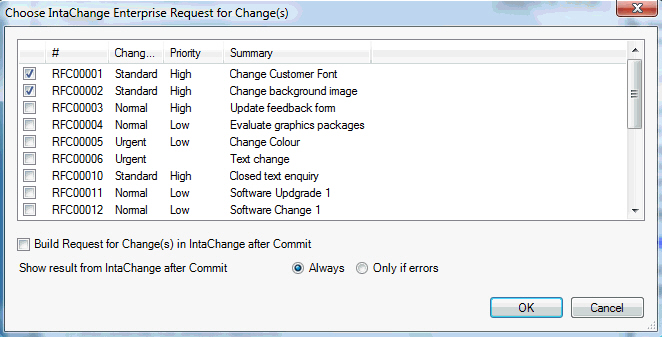
When a user “checks in”/”commits” new versions of files from a Subversion client, (depending on the facilities of the Subversion client) it can query IntaChange for (suitable) changes that are to be associated with the files, offers these to you for selection, and records: (a) Against the Subversion file version(s) which changes were selected. (b) Against the IntaChange Change record(s) which Subversion file version(s) were committed/changed and (c) Optionally, progresses the IntaChange change record to the next status in their life cycle/workflow.
When a user views a change record in IntaChange, IntaChange can access Subversion to fetch the actual file content of the version(s) committed/changed against that change record to enable you to see precisely what edits were performed. Similarly, (depending on the facilities of the Subversion client) when a user views a version in Subversion he can see which IntaChange change records were associated against it, and is able to simply click on it to access the change record in IntaChange.
ITIL® v3 Template, Ready to Use Out of the Box!
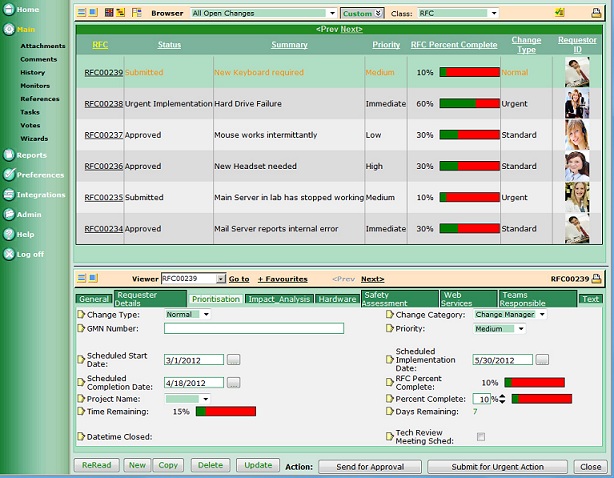
Independently ITIL® change management Template Ready for Immediate Use
Scale to any size of organization, project or company
Ready for you to adapt to any complexity of project
Everything you need is included:
Suggested role definitions
Permissions already defined
Best practice business rules and processes
Email actions and events
Suggested fields for the RFC’s ITIL® recommends
All ready for you to use or customize to your unique circumstances giving you the best foundation for your own change management system you could wish for.
ITIL® is a registered trade mark of the Cabinet Office
RSS Feeds Integration
Enable your end users to be made aware of an action without needing to read their email!
RSS (“Really Simple Syndication” or “Rich Site Summary”) is a format for delivering regularly changing web content. Many news-related sites, weblogs and other online publishers syndicate their content as an RSS Feed to whoever wants it. RSS feed readers are commonly available — for example, Microsoft Internet Explorer and Outlook both have integrated RSS readers, and so do many mobile devices.
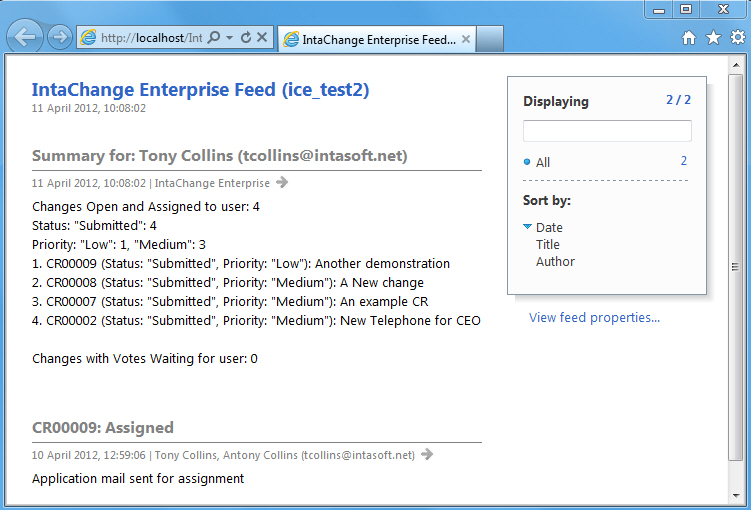
IntaChange Enterprise generates RSS “items” corresponding to changes in its change records but only to the specific end users it is relevant to and includes:
The number of changes currently assigned to the user
The number of changes in each status that are currently assigned to the end user
The Change record ID Number
The Status of the Change
The Priority attached to the change
A summary description of the change
The event that caused the notification
This website uses cookies to improve your experience. We'll assume you're ok with this, but you can opt-out if you wish.AcceptRead MoreReject
Privacy & Cookies Policy
Privacy Overview
This website uses cookies to improve your experience while you navigate through the website. Out of these, the cookies that are categorized as necessary are stored on your browser as they are essential for the working of basic functionalities of the website. We also use third-party cookies that help us analyze and understand how you use this website. These cookies will be stored in your browser only with your consent. You also have the option to opt-out of these cookies. But opting out of some of these cookies may affect your browsing experience.
Necessary cookies are absolutely essential for the website to function properly. This category only includes cookies that ensures basic functionalities and security features of the website. These cookies do not store any personal information.
Any cookies that may not be particularly necessary for the website to function and is used specifically to collect user personal data via analytics, ads, other embedded contents are termed as non-necessary cookies. It is mandatory to procure user consent prior to running these cookies on your website.